









































































Blueprints
Complete CRMs, ready to adapt.
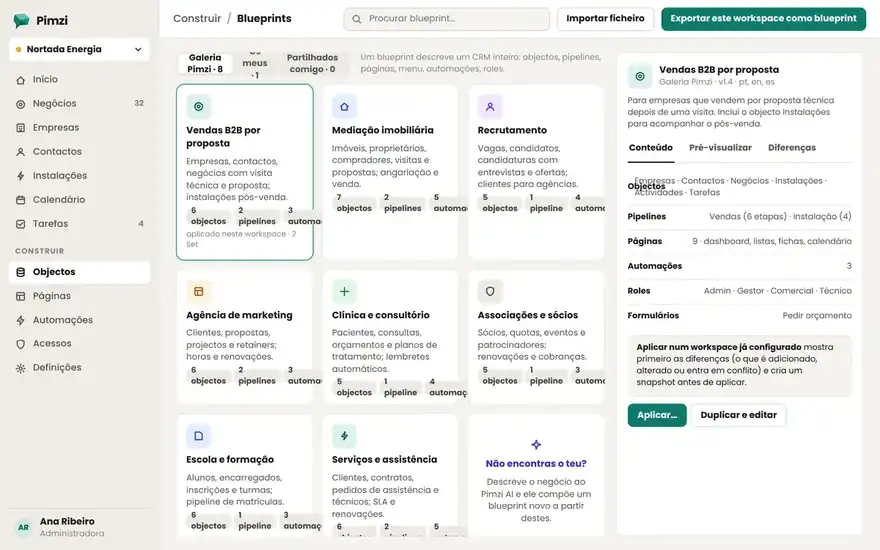
A blueprint is an entire CRM in a file: objects, fields, pipeline, pages, views, menu and automations. Apply it in one click, or let Pimzi AI use it as the starting point for your brief.
SalesB2B SalesCompanies, contacts, deals and activities. 6-stage pipeline with weighted forecasting. 5 objects · 6 stages · 7 pages · 4 automationsv1.4 · MainsystemsServicesEnergy installersTechnical proposals, installations, equipment and periodic maintenance. 8 objects · 6 stages · 9 pages · 6 automationsv1.2 · MainsystemsHealthcareClinicPatients, quotes, treatment plans, appointments and follow-up reminders. 6 objects · 5 stages · 7 pages · 5 automationsv1.1 · MainsystemsReal estateReal estate brokerageProperties, owners, buyers, viewings; listing and sales pipelines. 7 objects · 2 pipelines · 8 pages · 5 automationsv1.0 · MainsystemsAgenciesService agencyProposals, projects, hours, renewals and the client approval portal. 6 objects · 5 stages · 8 pages · 4 automationsv1.0 · MainsystemsEducationSchool and trainingApplications, enrollments, classes, parents and guardians, and installments. 7 objects · 5 stages · 7 pages · 5 automationsv1.0 · MainsystemsAssociationsAssociation and clubMembers, dues, events, volunteers and donors. Sign-up form included. 6 objects · 3 stages · 6 pages · 4 automationsv1.0 · MainsystemsServicesService and maintenanceEquipment, requests, maintenance contracts and periodic visits. 6 objects · 5 stages · 7 pages · 5 automationsv1.0 · MainsystemsRecruitingRecruiting and candidatesOpenings, candidates, interviews and offers. Built by an HR partner. 5 objects · 6 stages · 6 pages · 3 automationsv0.9 · Mainsystems
How it works
Apply, adapt, export.
- Apply: in an empty workspace or on top of an existing one, with a diff of what will be created and a snapshot beforehand.
- Adapt: with Pimzi AI or in build mode, rename, add or remove. Your adjustments stay yours.
- Export: your workspace becomes a JSON blueprint, to replicate for another client or keep as a reference.
Partners
Partner program
Private blueprints for your accounts.
An agency keeps its blueprints, versions them and applies them to each new client over MCP. The client sees a CRM; you see an afternoon's work.
Frequently asked questions
About blueprints
Can I apply two blueprints?–
Yes. Shared objects (Companies, Contacts) are merged; the rest is added. The diff shows everything beforehand.
Do blueprints cost money?+
The Mainsystems ones are included in every plan. Partner blueprints can be free or paid; the price is on each blueprint's page.
What happens when a blueprint is updated?+
Nothing, until you want it to. You see what changed and apply only what makes sense; your adjustments are left untouched.