









































































The AI that builds your CRM.
It's not an assistant that writes emails. Pimzi AI creates objects, fields, pages, views, menus and automations, and works your data, from one sentence. With preview, history and undo.
Two hands: one builds, the other works.
Operates the CRM itself.
- Creates and changes objects, fields and relations
- Designs pipelines, stages and per-stage rules
- Composes pages, views, dashboards and menus
- Writes automations and tests them with a record
- Applies and adapts blueprints; adjusts permissions and theme
Operates your data.
- Creates, updates and merges records, one at a time or in bulk
- Summarizes the relationship with a customer and suggests the next step
- Drafts emails and notes from the record's context
- Answers questions: “how many deals have been stalled for over 30 days?”
- Imports a CSV and proposes the mapping
The power to change everything. A net so nothing breaks.
- Preview
Every write runs as a dry-run first. You see the diff before saving; in bulk operations, you see the affected records.
- Undo per action
Every command stays in the history with its inverse. One click undoes it. Including what your external agent did over MCP.
- Snapshots
Before bulk operations, Pimzi saves the entire configuration. Restore to any point.
- Your rules
The AI acts on behalf of the user, with their permissions. Destructive actions ask for confirmation. Quotas per plan, limit per session.
Real sentences, real results.
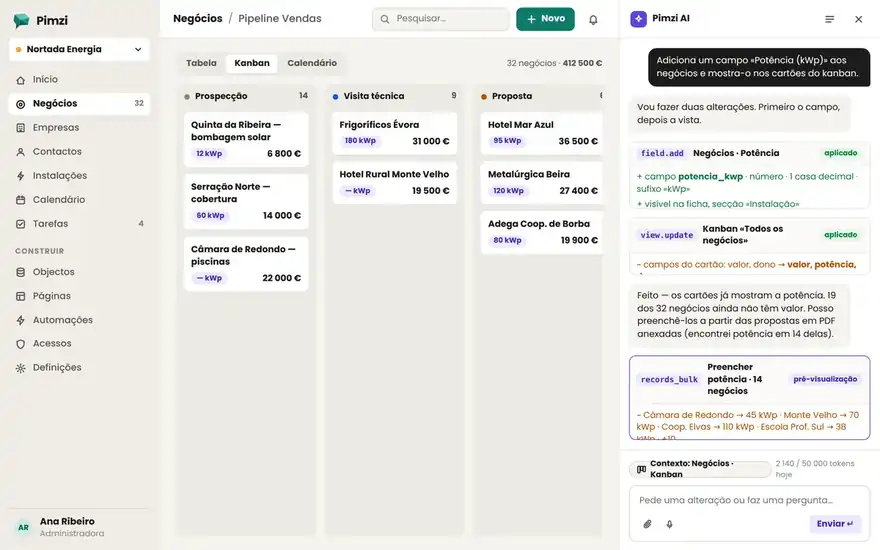
- “Add a Capacity (kWp) field to deals and show it on the kanban cards.”
→ numeric field created, added to the record layout and the kanban view. 1 card, 3 changes, 1 undo.
- “When a deal moves to Won, create an Installation and a task for the technical team.”
→ automation with trigger, condition and two actions; tested with the last deal won.
- “Which customers haven't been contacted in over 60 days, sorted by value?”
→ list with 14 records, saved as a “Reactivate” view if you want.
- “Make a home page for management with revenue by month, pipeline by stage and the 10 biggest deals.”
→ dashboard with 3 blocks, available only to the Management role.
- “Import this contacts CSV and merge the duplicates by email.”
→ mapping proposed, 212 imported, 9 merged, report in the inbox.
- “Summarize the relationship with Nortada Energia and propose the next step.”
→ summary of the last 5 events and a suggested task, accepted with one click.
Five questions, one complete CRM.
Pimzi AI takes the brief like a consultant would and delivers in seconds what a consultant delivers in weeks. It starts from an industry blueprint, adapts objects, pipeline and pages, shows the proposal and saves a snapshot before creating anything.
See the blueprints by industry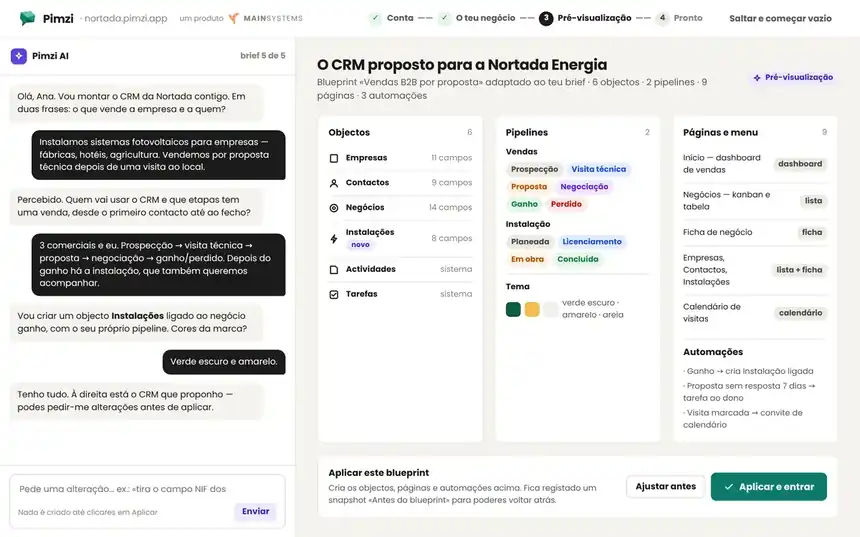
Transparent by design.
Two models: an economical one for working data, a strong one for building. Quotas per plan, extra packs and your own key from Premium up.
| Plan | Tokens included / month | Model | BYOK |
|---|---|---|---|
| Free | 200k | Economical | No |
| Standard | 1M | Economical | No |
| Premium | 5M | Strong, for building | Anthropic or OpenRouter |
| Enterprise | 20M | Strong · scheduled agents | Yes, or your own key per tenant |
Packs: +1M tokens for €10 · +5M for €40. Your data never trains models: providers under zero-retention contracts. Security and GDPR