









































































Connect your agent to your CRM.
Pimzi is MCP-first. An MCP server with OAuth exposes everything Pimzi AI can do: Claude, ChatGPT, Cursor or the agent you built read, write and reconfigure the CRM, with your permissions, history and undo.
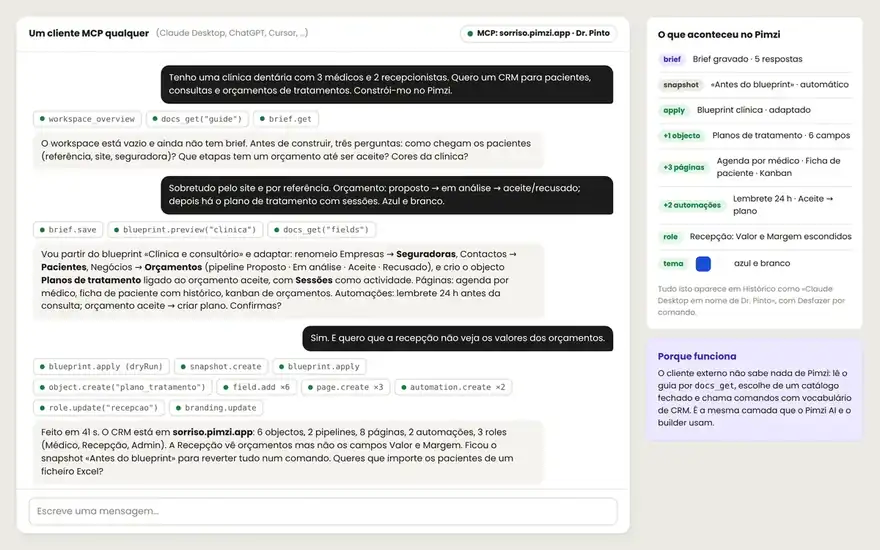
Two minutes. No keys copied by hand.
Paste the server URL
In your MCP client, add your workspace's server.
https://mcp.pimzi.com/nortada
Authorize with your account
OAuth 2.1 with PKCE and dynamic client registration. You see what the agent will be able to do and approve it. Revoke whenever you want.
Talk
The agent starts by reading the workspace's live documentation (docs_get) and the brief. Then it builds, operates, asks.
A catalog by topic, documentation included.
About 40 visible tools and 120 commands, loaded by topic to fit in any context. Each resource is one tool with an op: object, field, page, view, automation, record.
- Discovery
workspace_overview · docs_get · tools_search · brief
- Model
object · field · relation · pipeline · stage · duplicate_rule
- Pages and views
page · block · view · menu · theme
- Automations
automation · automation_test · form · email_template
- Data
records_query · record · records_bulk · import · merge
- Security and history
role · permission · history · undo · snapshot · blueprint_apply
An agent with powers, inside a fence.
- On someone's behalf
The agent acts on behalf of the user who authorized it, with their permissions. Nothing above that.
- Dry-run and confirmation
Writes run in simulation first; destructive ones require confirm. In bulk, a preview.
- Journal and undo
Every MCP session has a journal. Every command has an inverse. Automatic snapshot before batches.
- Revocable, auditable
Tokens per client, immediate revocation, everything in the history as “agent X on behalf of Y”.
Everything the UI does, the API does.
No marketplace with 500 logos. The right doors, done well.
- REST API
Scoped keys, pagination, view filters, OpenAPI.
- Webhooks
Outgoing per event with the record as JSON; incoming as a trigger. Zapier, Make, n8n.
BCC to log; IMAP/SMTP per user (Premium); native Google and M365 (Enterprise).
- Calendar
ICS per user; two-way sync on Enterprise.
- Web forms
Embed or page with your brand, anti-spam, mapping to objects.
- Import and export
CSV and Excel; workspace blueprint as JSON.